 Preenshot
Don’t just screenshot.
Preenshot.
Preenshot preens a raw capture into a polished image in one click: padding, a gradient background and a window frame. It pixelates API keys and emails on your Mac before anyone sees them, then copies a share link.
$19.99 once. No subscription. Cloud links optional, $7.99/mo.
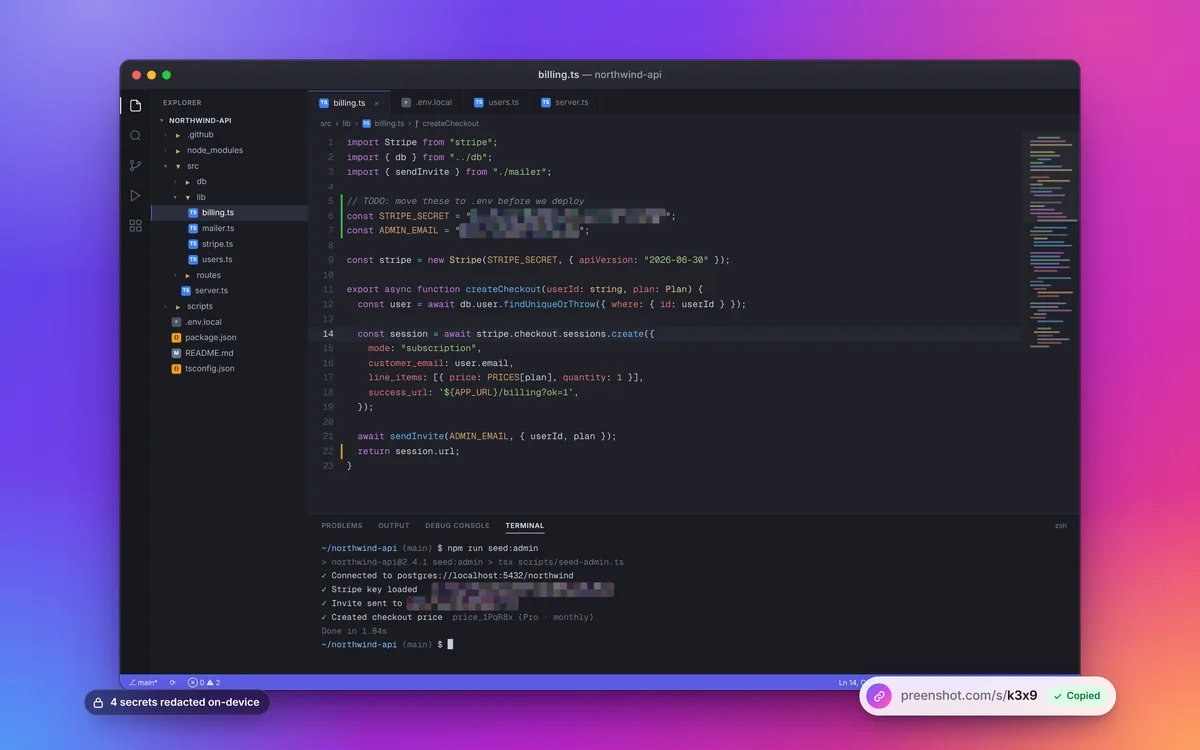
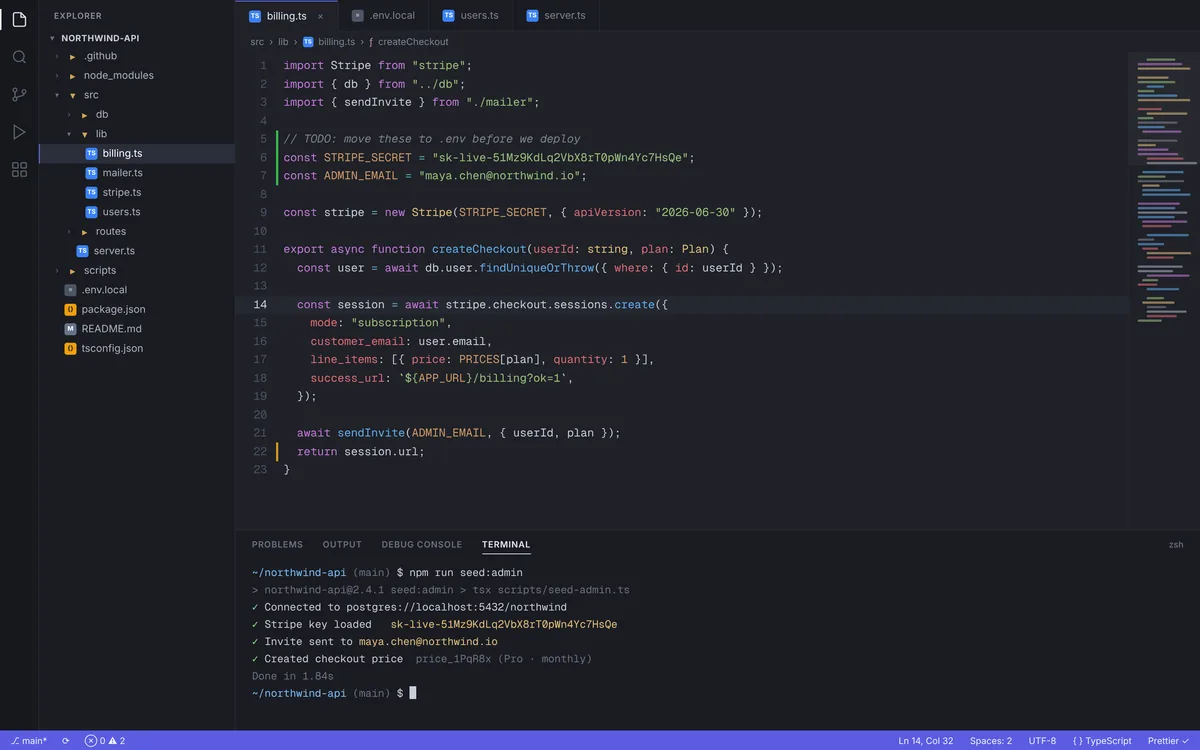
Drag to compare. One click took it from a raw capture to ready to post.
How it works
Capture → Beautify → Share
Three steps, a few seconds, and nothing leaves your Mac until you decide to share.
Capture
Press ⌃⇧2 or click the menu bar icon. Grab an area, a window, the full screen or an exact size.
Beautify
Padding, gradient backgrounds, rounded corners and shadow. Preenshot finds secrets and redacts them for you to confirm.
Share
Copy the image, drag it into Slack or Mail, or click Share to copy a link with a rich preview.
Features
Everything a screenshot needs. Nothing it doesn't.
A fast, native Mac app with no account to create and no analytics. It's built for people who share screens all day.
Backgrounds & padding
Gradient presets, solid colors or transparent, with padding, corner radius and shadow, plus auto-balance.
Blur secrets automatically
On-device text recognition finds emails, API keys, card numbers, IBANs, phone numbers and IPs, then redacts them.
One-click share links
Optional Preenshot Cloud uploads only the image you share and copies a short link. Delete it anytime.
Exact social sizes
One-tap presets for X 16:9, LinkedIn 1.91:1, Instagram 1:1 and 4:5, plus 16:9, 4:3 and 9:16.
Window frames
Wrap captures in clean macOS window chrome, with traffic lights and a title, so they look at home anywhere.
Copy & drag anywhere
Captures go straight to your clipboard by default. Drag the Quick Access thumbnail into any app.
Screen recording & GIF
Record any area to MP4 at 30 or 60 fps, with optional system audio, then convert it to a GIF.
Text recognition
Copy text from any part of your screen with ⌃⇧6. QR codes and barcodes too, all on-device.
Compare
How Preenshot compares
Xnapper and CleanShot X are great apps. Here is the honest difference.
| Feature | Preenshot | Xnapper | CleanShot X |
|---|---|---|---|
| Price (one Mac) | $19.99 one-time (Pro) | $29.99 one-time | $35 one-time |
| Updates | Delivered through the App Store | 1 year included; optional renewal at 40% off | 1 year included; optional renewal at $19/yr |
| Native app on the Mac App Store | Yes | No, sold at xnapper.com1 | No, sold at cleanshot.com and via Setapp |
| Refunds | Through Apple | 30-day money-back guarantee | 30-day money-back guarantee |
| Auto-redact sensitive info | Yes, on-device | Yes | See vendor |
| Cloud share links | Optional, $7.99/mo (3-day free trial) | Listed as “coming soon” | Included with 1 GB; unlimited on Pro at $10/user/mo, billed annually |
Prices in USD as listed on each vendor's own site, checked October 7, 2026. They may change. 1Xnapper's iPad app is on the App Store and can run on Apple silicon Macs; the Mac license is sold separately. Xnapper and CleanShot are trademarks of their respective owners.
Pricing
Pay once. Add the cloud only if you want it.
Preenshot is a free download. Unlock Pro with a single in-app purchase that's yours to keep.
Free
Free forever
- Every capture mode and hotkey
- Editor with arrows, text, steps and manual redact
- Basic beautify: backgrounds and padding
- Text recognition and QR codes
- Capture history, 3 pins
Pro
One-time purchase. No subscription.
- Everything in Free
- Auto-redact secrets, on-device
- Saved beautify presets
- Full-text search across your history
- Unlimited pins
Preenshot Cloud
3-day free trial. Cancel anytime.
- One-click share links (preenshot.com/s/…)
- Rich previews in Slack, X and iMessage
- Delete any link, anytime
- No extra account; billed by the App Store
- Uploads happen only when you click Share
Prices in USD. The App Store shows your local price and taxes.
FAQ
Questions, answered
Does Preenshot upload my screenshots?
No. Capturing, editing, text recognition and redaction all happen on your Mac. Preenshot uploads an image only when you click Share with Preenshot Cloud, and then only that image. The app has no analytics or tracking.
How does automatic redaction work?
Apple's Vision framework reads the text in your screenshot on-device. Preenshot then looks for emails, phone numbers, card numbers, IBANs, API keys and tokens, and IP addresses. You review what it found, and one click redacts everything you selected. Redaction permanently replaces the pixels with solid color or a coarse, noisy mosaic, so it can't be "un-blurred". Always give the result a quick look before you share.
Why the Mac App Store?
Apple handles payment, receipts and updates, and Preenshot runs in Apple's App Sandbox. Install it on every Mac signed in with your Apple ID without entering license keys.
Can I get a refund?
Purchases and subscriptions are processed by Apple, so refunds go through Apple too. Request one at reportaproblem.apple.com.
Do I need Preenshot Cloud?
No. Copy, save and drag-and-drop work without it. Cloud is an optional $7.99/month subscription for share links, with a 3-day free trial. Cancel anytime in your App Store account settings.
Can I delete a shared link?
Yes, anytime, from the app. The image is deleted from storage right away. Cached copies can take a few minutes to disappear from the network, and we can't recall copies other people already downloaded.
Which Macs are supported?
macOS 13 Ventura or later, on Apple silicon and Intel Macs.
Make your next screenshot the good one.
$19.99 once. No subscription. Cloud links optional, $7.99/mo.
Download on theMac App Store